

Fonto 8.16 focuses on what matters most in day-to-day content creation: reliability, smooth collaboration, and a more intuitive review experience. This release builds on recent innovations like Suggestion Mode, refining them with real-world feedback to make workflows more predictable and efficient.
At the same time, we’re strengthening the foundation of the Fonto platform, from more robust concurrent editing and improved Word paste behavior to a more consistent and reliable output experience. New integrations, like adding review annotations directly within Document History, bring us closer to a fully unified content lifecycle.
Whether you’re authoring, reviewing, or publishing, Fonto 8.16 helps you move faster with greater confidence.
Fonto Editor
Fonto Editor gets a solid round of reliability improvements in 8.16. Edge cases that could cause unexpected behavior during saves have been resolved, making concurrent editing workflows more robust. Pasting from Word is also more faithful, with list content containing bookmarks no longer being silently dropped.
Fonto Review
Suggestion Mode, launched in Fonto 8.15, takes a significant step forward in this release. We’ve fixed a wide range of real-world edge cases, from suggestion attribution issues when system changes were involved, to problems creating annotations while in suggestion mode. The result is a noticeably smoother, more predictable experience for both authors and reviewers.
Two welcome usability additions round things out: the suggestions navigator now offers a one-click option to accept or reject all suggestions for the focused document, making it much faster to process a batch of changes. The Suggestion Mode drop button also has a refreshed, less prominent appearance, so it fits more naturally into the editor interface.
Fonto Document History
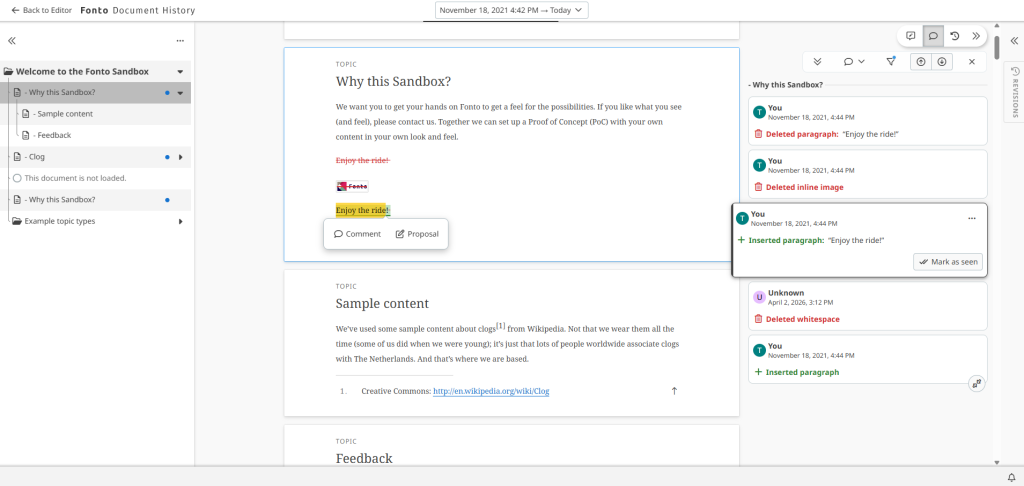
This release brings one of the most-requested integrations to life: the new fontoxml-document-history-feedback add-on makes it possible to create Fonto Review annotations directly from within Fonto Document History. Reviewers can now leave comments on specific historical changes without losing context. This is a meaningful step toward a fully unified review experience across the Fonto platform, and something we’ve been building toward for several releases.
Fonto Content Quality
The backend components of Fonto Content Quality have been upgraded with improvements to enhance security.
Fonto Output
This release of Fonto Output delivers a smoother, more reliable, and more visually consistent document generation experience. Stylesheets now offer greater creative flexibility, and documents export more accurately across all formats, with improved layout behavior and better handling of content in complex scenarios.
We’ve also strengthened the overall stability of the system, ensuring it performs reliably even under heavy workloads. Document previews, images, and structured elements now render more predictably, providing results that stay true to the intended design.
Additionally, annotations are now processed more intelligently, and the platform has been refreshed to provide a more modern and resilient foundation for future enhancements.
Tridion One
Reuse during instantiation
Tridion One now allows reusing components from other documents during document instantiation. When instantiating a new document, Tridion One provides a list of existing components that can be reused from other documents to simplify the process of creating accurate first drafts.
Instantiation of AI prompts
Prior to this release, AI prompts inserted in templates would be resolved during documentation instantiation, only offering authors the option to accept or reject the new content. Starting with this version, AI prompts will be kept unchanged in documents, and authors will be able to connect to the AI system using an iFrame within a modal to interact with the AI system, allowing them to refine the response before inserting the content into the editor.
Output tagging
It is now possible to configure one data source to use for tagging content and use the tags in Fonto Output to apply any style to tagged content. Output templates can be extended to retrieve the tags from the metadata and use them to alter the output. For example, to identify content to embed in a box warning or content reflecting a recent major change.
Figures listed sidebar
We have included a new sidebar containing lists of all table, image, and equation figures in a publication. Entries in these lists will be grouped by component, and show their numbering and title, if available. They can also be used to navigate directly to each item.
What’s Next?
The coming releases for Fonto include new ways to manage large amounts of comments. Where our balloon interaction provides great in-context interactions, the overview sometimes can get lost. We’re working on solving that by including an alternative sidebar approach where users can scroll through comments without losing the context of the content.
Furthermore, we’ll be bringing management functionality to group comments together and tag specific ones for further processing. By letting users focus on specific buckets of commentary, review interactions will be much more efficient.
Explore our full roadmap.
Try Fonto 8.16 today!
Ready to explore the latest updates? Give Fonto 8.16 a try and experience the improvements for yourself.

Customer Success Manager at Fonto – Passionate runner and Dad